Data Engineering Path · Airflow

Production Best Practices
🏭 Running Airflow at Scale in Production
Moving from development to production requires careful attention to reliability, monitoring, and operational best practices. This guide covers the patterns that distinguish hobby projects from enterprise-grade data platforms.
The 10 Commandments of Production Airflow
| # | Rule | Why It Matters |
|---|---|---|
| 1 | Idempotency | Every task should produce the same output when run multiple times for the same logical date |
| 2 | Atomicity | Each task should do one thing and do it completely — no partial states |
| 3 | No side effects at parse time | Don't make API calls or DB queries when the DAG file is imported |
| 4 | Use Connections, not hardcoded creds | Security, reusability, and environment separation |
| 5 | Set retries and timeouts | Self-healing pipelines that don't run forever |
| 6 | Keep DAGs simple | Fewer tasks per DAG, more DAGs if needed. Max ~30 tasks per DAG |
| 7 | Use tags and descriptions | Discoverability in the UI. Your future self will thank you |
| 8 | Test before deploying | DagBag validation + unit tests in CI/CD |
| 9 | Monitor with SLAs and alerts | Proactive detection of pipeline delays |
| 10 | Clean up old data | Regular cleanup of metadata DB, logs, and XCom entries |
Idempotency Pattern
# ❌ NOT idempotent — appends every time
@task()
def bad_load(data):
    hook = PostgresHook("warehouse")
    hook.insert_rows("sales", data)  # Duplicates on re-run!

# ✅ Idempotent — delete-then-insert
@task()
def good_load(data, **kwargs):
    ds = kwargs['ds']
    hook = PostgresHook("warehouse")

    # Delete existing data for this date first
    hook.run(f"DELETE FROM sales WHERE sale_date = '{ds}'")

    # Then insert fresh data
    hook.insert_rows("sales", data)
Monitoring & Alerting
from airflow.sdk import DAG
from datetime import datetime, timedelta

with DAG(
    "monitored_pipeline",
    schedule="0 6 * * *",
    start_date=datetime(2024, 1, 1),
    # SLA: entire DAG should complete within 2 hours of scheduled time
    dagrun_timeout=timedelta(hours=2),
    default_args={
        "retries": 3,
        "retry_delay": timedelta(minutes=5),
        "email_on_failure": True,
        "email_on_retry": True,
        "email": ["oncall@company.com"],
        "execution_timeout": timedelta(hours=1),  # Per-task timeout
        "sla": timedelta(hours=1),  # SLA per task
    },
    # Callback functions for DAG-level events
    on_failure_callback=send_slack_alert,
    on_success_callback=log_success_metric,
) as dag:
    ...
💡 Tip
Set up three layers of alerting: (1) Per-task email on failure, (2) DAG-level Slack notification via callback, (3) SLA miss alerts for business-critical pipelines. This ensures nothing falls through the cracks.
Set up three layers of alerting: (1) Per-task email on failure, (2) DAG-level Slack notification via callback, (3) SLA miss alerts for business-critical pipelines. This ensures nothing falls through the cracks.
DAG Organization at Scale
dags/
├── __init__.py
├── common/
│   ├── __init__.py
│   ├── callbacks.py          # Shared alert functions
│   ├── quality_checks.py     # Reusable data quality tasks
│   └── constants.py          # Shared configuration
├── sales/
│   ├── __init__.py
│   ├── daily_sales_etl.py
│   └── sales_quality.py
├── marketing/
│   ├── __init__.py
│   ├── campaign_pipeline.py
│   └── attribution_model.py
└── infrastructure/
    ├── __init__.py
    ├── cleanup_metadata.py    # DB maintenance
    └── dag_health_monitor.py  # Meta-DAG monitoring
📘 Note
Organize DAGs by domain (sales, marketing, finance), not by technical layer (extract, transform, load). Each team owns their domain's DAGs, which aligns with organizational structure and code ownership.
Organize DAGs by domain (sales, marketing, finance), not by technical layer (extract, transform, load). Each team owns their domain's DAGs, which aligns with organizational structure and code ownership.
Secure Connection Management in the Web UI
One of the most important production best practices is the separation of credential configurations from Python code (Commandment #4).
Instead of hardcoding database passwords, OAuth tokens, or AWS credentials inside your DAG scripts, you configure them securely inside the Airflow Web UI's Admin -> Connections panel:
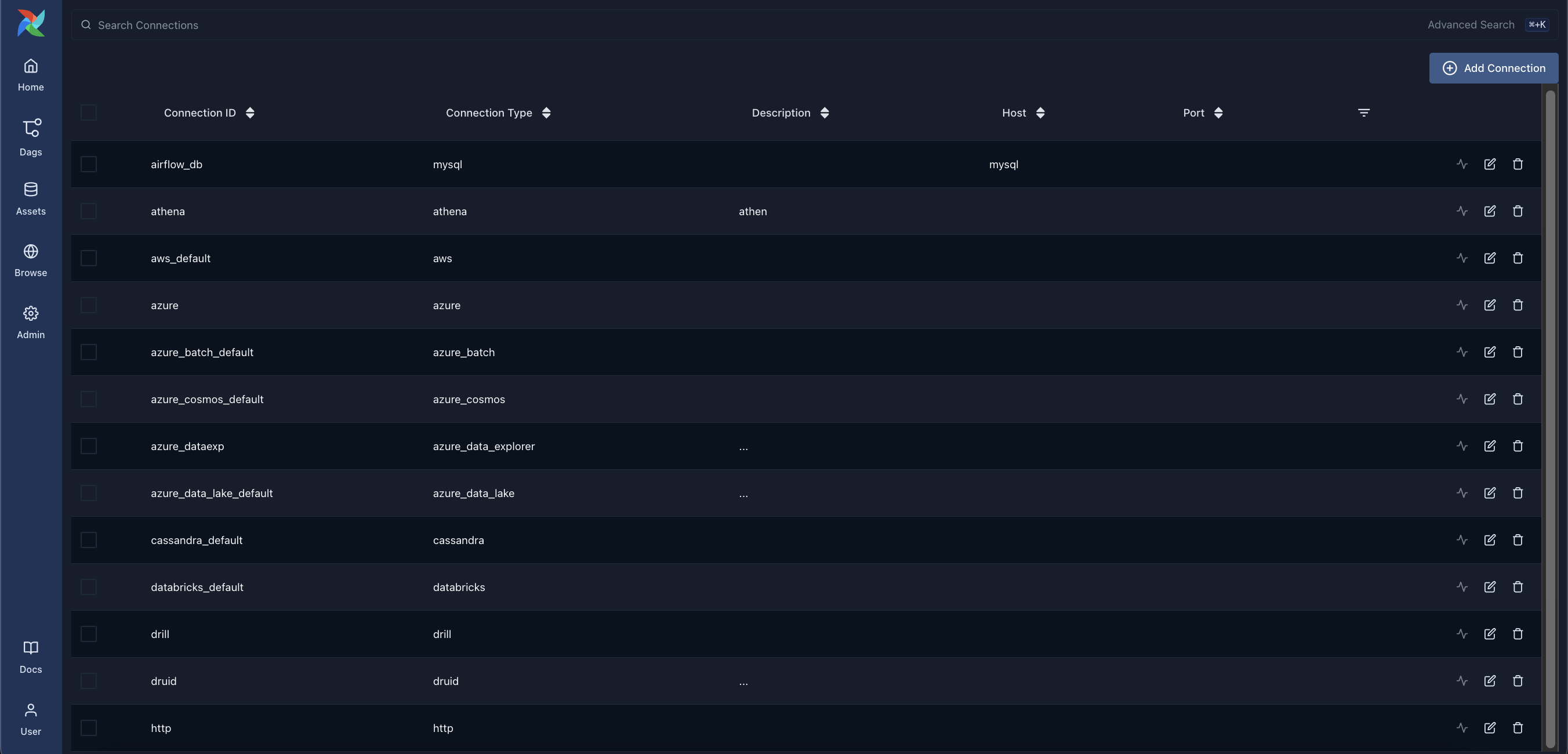
These connections are encrypted at rest in the metadata database and are retrieved dynamically at runtime by hooks using their unique connection ID (conn_id).